PantherUI-Apex
PantherUI v2.0
A lightweight 3D carousel UI component library. Panels rotate on a CSS rotateY cylinder using the Pointer Events API for unified mouse, touch, and stylus input.
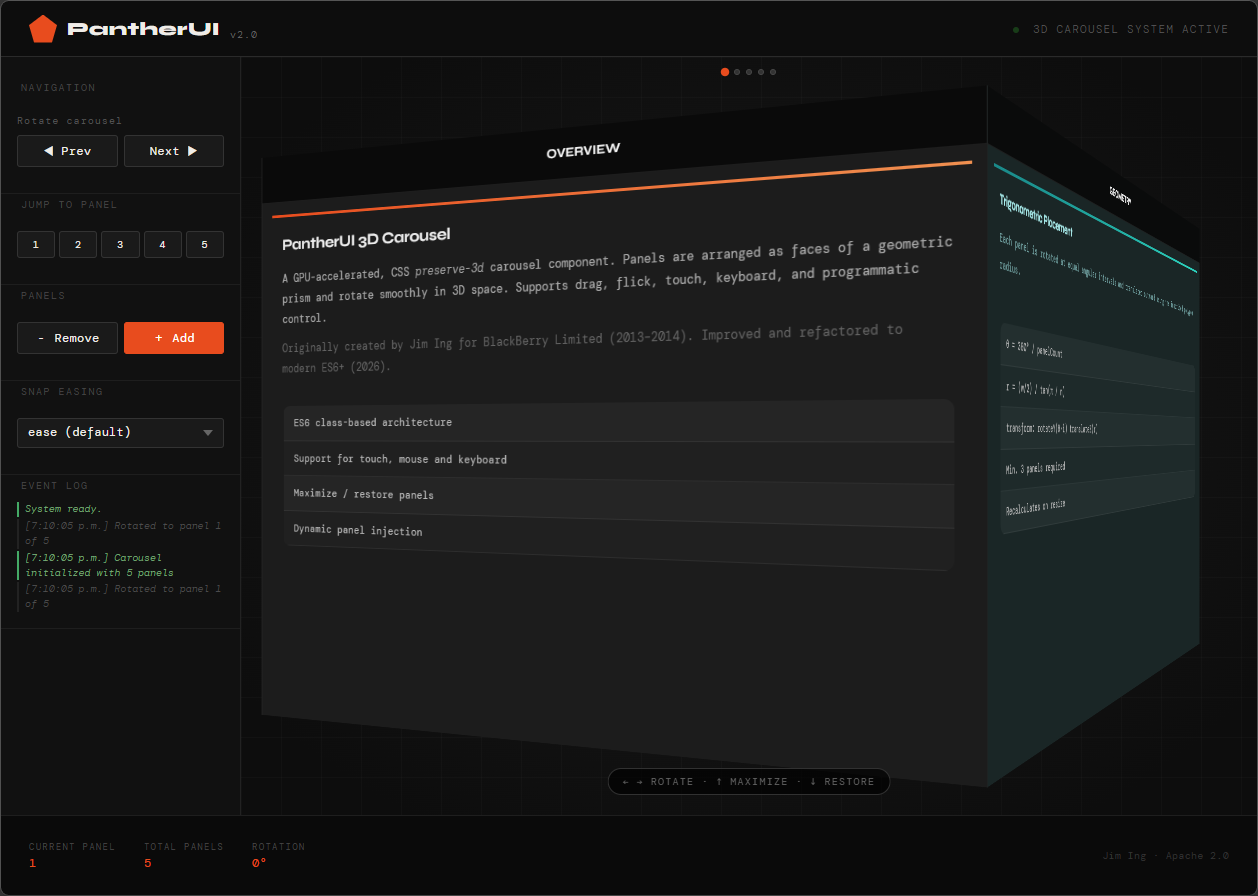
Originally by Jim Ing (@jim_ing) for BlackBerry Limited (2013–2014). Refactored to modern ES6+ (2026).
Licensed under the Apache License 2.0.
Demos
Files
| File | Description |
|---|---|
PantherUI.js |
Library — Carousel3D class and Panther.Carousel module |
PantherUI.css |
Base carousel styles |
Quick Start
<link rel="stylesheet" href="PantherUI.css"/>

<!-- Carousel container -->
<div class="panther-Carousel-container" id="container-demo">
  <div class="panther-Carousel-carousel" id="my-carousel">
    <figure>
      <div class="panther-Carousel-panelTitleBar">
        <span class="panther-Carousel-panelTitle">Panel 1</span>
      </div>
      <div class="panther-Carousel-panelContent">Content A</div>
    </figure>
    <figure>
      <div class="panther-Carousel-panelTitleBar">
        <span class="panther-Carousel-panelTitle">Panel 2</span>
      </div>
      <div class="panther-Carousel-panelContent">Content B</div>
    </figure>
    <figure>
      <div class="panther-Carousel-panelTitleBar">
        <span class="panther-Carousel-panelTitle">Panel 3</span>
      </div>
      <div class="panther-Carousel-panelContent">Content C</div>
    </figure>
  </div>
</div>

<script src="PantherUI.js"></script>
<script>
  Panther.Carousel.init({
    id: 'my-carousel',
    easing: 'easeInOutCubic',
    callback(c) {
      console.log('Now showing panel', c.sideIndex);
    }
  });
</script>
A minimum of 3 panels is required for the 3D geometry to work.
DOM Structure
.panther-Carousel-container        ← receives pointer events, sized to fill parent
  .panther-Carousel-carousel       ← rotates in 3D (transform-style: preserve-3d)
    figure                         ← one per panel (any count ≥ 3)
      .panther-Carousel-panelTitleBar
        .panther-Carousel-panelTitle
      .panther-Carousel-panelContent
The container must have an explicit width and height (or be inside a sized parent) before init() is called, since panel geometry is calculated from offsetWidth at init time.
API Reference
All methods are on the Panther.Carousel namespace.
init(opts) → Carousel3D | null
Initialise a carousel. Must be called after the element is in the DOM with a non-zero width.
Panther.Carousel.init({
  id:              'my-carousel',   // required — ID of the carousel element
  backgroundColor: '#1a1a2e',       // optional — panel background colour
  easing:          'easeOutExpo',   // optional — named key or raw CSS transition
  callback:        (c) => {}        // optional — called on every panel change
});
callback receives the Carousel3D instance. Useful fields:
| Property | Type | Description |
|---|---|---|
c.sideIndex |
number |
0-based index of the currently visible panel |
c.panelCount |
number |
Total number of panels |
c.rotation |
number |
Current rotation in degrees |
refresh()
Recalculate geometry for all carousels. Call after a resize or orientation change (PantherUI also does this automatically via window.addEventListener('resize', ...)).
Panther.Carousel.refresh();
turnNext(carouselId)
Rotate one panel forward.
Panther.Carousel.turnNext('my-carousel');
turnPrev(carouselId)
Rotate one panel backward.
Panther.Carousel.turnPrev('my-carousel');
turnTo(carouselId, side, callback?)
Rotate to a specific panel by 1-based index. Accepts a single ID or an array of IDs to turn multiple carousels simultaneously.
Panther.Carousel.turnTo('my-carousel', 3);

// Turn multiple carousels to the same panel
Panther.Carousel.turnTo(['carousel-0', 'carousel-1', 'carousel-2'], 2, (id, side) => {
  console.log(id, 'turned to', side);
});
setEasing(carouselId, easing)
Set the snap-transition easing for a single carousel. Accepts a named key from EASINGS or a raw CSS transition string.
Panther.Carousel.setEasing('my-carousel', 'easeOutBack');
Panther.Carousel.setEasing('my-carousel', '500ms ease-in-out');
setAllEasings(easing)
Set the snap-transition easing for all active carousels at once.
Panther.Carousel.setAllEasings('easeOutExpo');
setSensitivity(value)
Set the drag sensitivity multiplier for all carousels. 1.0 requires dragging one full panel-width to rotate one face. Values above 1.0 reduce the distance required. Clamped to 0.5 – 5.0.
Panther.Carousel.setSensitivity(2.0); // half the panel width rotates one face
maximize(carouselId)
Expand a carousel’s container to fill the viewport. Hides all other carousels.
Panther.Carousel.maximize('my-carousel');
restore(carouselId)
Restore a maximized carousel to its original size and show all other carousels.
Panther.Carousel.restore('my-carousel');
addPanel(title, content) — instance method
Dynamically add a new panel to a carousel. Calls refresh() automatically.
const c = Panther.Carousel.all['my-carousel'];
c.addPanel('Panel 4', '<p>Dynamic content</p>');
removeLastPanel(carouselId) → boolean
Remove the last panel. Enforces a minimum of 3 panels; returns false if at minimum.
Panther.Carousel.removeLastPanel('my-carousel');
all
Registry of all active Carousel3D instances, keyed by element ID.
const c = Panther.Carousel.all['my-carousel'];
console.log(c.sideIndex, c.panelCount, c.rotation);
Easings
Named easing presets available via setEasing / setAllEasings / init({ easing }):
| Key | CSS value | Character |
|---|---|---|
ease |
750ms ease |
Browser default |
linear |
750ms linear |
Constant speed |
easeIn |
750ms ease-in |
Slow start |
easeOut |
750ms ease-out |
Slow end |
easeInOut |
750ms ease-in-out |
Slow start and end |
easeInOutSine |
750ms cubic-bezier(0.45, 0, 0.55, 1) |
Gentle S-curve |
easeInOutCubic |
750ms cubic-bezier(0.65, 0, 0.35, 1) |
Medium S-curve (default) |
easeInOutQuart |
750ms cubic-bezier(0.76, 0, 0.24, 1) |
Strong S-curve |
easeInOutQuint |
750ms cubic-bezier(0.87, 0, 0.13, 1) |
Very strong S-curve |
easeOutBack |
750ms cubic-bezier(0.34, 1.56, 0.64, 1) |
Slight overshoot |
easeOutExpo |
400ms cubic-bezier(0.16, 1, 0.3, 1) |
Snappy, fast settle |
easeInOutBack |
1100ms cubic-bezier(0.68, -0.55, 0.27, 1.55) |
Elastic bounce |
Access the full map at runtime via Panther.Carousel.EASINGS.
Drag Behaviour
Input is handled via the Pointer Events API, which unifies mouse, touch, and stylus into a single event stream. setPointerCapture keeps the drag live even if the pointer leaves the element.
Pixel-to-degrees mapping:
rotation_delta = dx_pixels × (theta / panelSize) × sensitivity
Where theta = 360 / panelCount and panelSize = element.offsetWidth.
At the default sensitivity of 1.0, dragging one full panel-width rotates exactly one face. At 2.0, half the panel-width is sufficient.
Flick / momentum: if the pointer was moving faster than 0.3 deg/ms at release, the carousel automatically advances one extra panel in the flick direction.
Deadzone: movements under 6px are treated as clicks, not drags.
CSS Custom Properties
| Property | Default | Description |
|---|---|---|
--panther-transition |
750ms cubic-bezier(0.65, 0, 0.35, 1) |
Snap transition applied to the carousel element. Set per-container by setEasing(). |
Carousel3D Instance Properties
| Property | Type | Default | Description |
|---|---|---|---|
id |
string |
'' |
Element ID |
rotation |
number |
0 |
Current rotation in degrees |
panelCount |
number |
— | Number of panels |
panelSize |
number |
— | offsetWidth of the carousel element |
theta |
number |
— | Degrees per face (360 / panelCount) |
radius |
number |
— | Cylinder radius in pixels |
sideIndex |
number |
0 |
0-based index of the front-facing panel |
sensitivity |
number |
1.0 |
Drag multiplier |
backgroundColor |
string |
'rgb(209,209,209)' |
Default panel background |
maximized |
boolean |
false |
Whether the carousel is currently maximized |
callback |
function\|null |
null |
Called on every panel change |
Browser Support
Requires: CSS transform-style: preserve-3d, CSS Custom Properties, Pointer Events API, ES6 classes.
Tested on: Chrome 120+, Firefox 121+, Safari 17+, Chrome for Android, Safari for iOS.